Best Remini Alternatives in 2026: Free and Paid Apps Compared
Remini made AI photo enhancement popular, but it’s far from the only option anymore. Maybe you’ve hit the daily free limit, gotten tired of the watermark, or just want a tool that handles old family photos better than it handles selfies. Whatever the reason, a whole lineup of apps can sharpen, upscale, colorize, and restore your images some free, some paid, some built for desktops, others for quick browser fixes. This guide walks through the strongest Remini APK alternatives available right now, broken down by what each one actually does best, so you can stop guessing and start enhancing.
Why People Look for Remini Alternatives
Remini built its name on fixing blurry selfies fast, and it still does that job well. But plenty of users run into the same friction points over and over: a handful of free credits each day, a watermark on exports unless you upgrade, and separate subscriptions for the app and web versions that don’t transfer. Others simply need something Remini Premium Apk wasn’t designed for, like full old-photo restoration that preserves scratches, faded color, and background detail not just a sharper face. Knowing your real goal makes the search for an alternative a lot shorter.
What to Look for in a Photo Enhancer
Before picking a tool, it helps to know what separates a genuinely useful enhancer from a flashy but limited one. These four factors matter most when you’re comparing options side by side.
Resolution and Detail Quality
Some apps simply sharpen edges; others rebuild missing detail using AI models trained on millions of reference photos. Higher output resolution, like 4K or 8K, matters a lot if you plan to print the photo or display it large on a screen.
Watermark-Free Exports
Few things ruin a carefully restored photo faster than a logo stamped across someone’s face. Always check whether the free tier actually lets you download a clean image, or if that’s quietly locked behind a paywall you won’t see until checkout.
Pricing and Free Limits
Free plans range from genuinely unlimited to just a few credits a day. Read the fine print on daily caps, maximum image size, and whether mobile and web subscriptions are treated as the same purchase or billed separately.
Ease of Use
A tool with impressive results but a confusing interface still wastes your time. The best apps let you upload a photo, click once, and download the result with manual settings available only if you actually want to dig in.
Top Remini Alternatives Compared
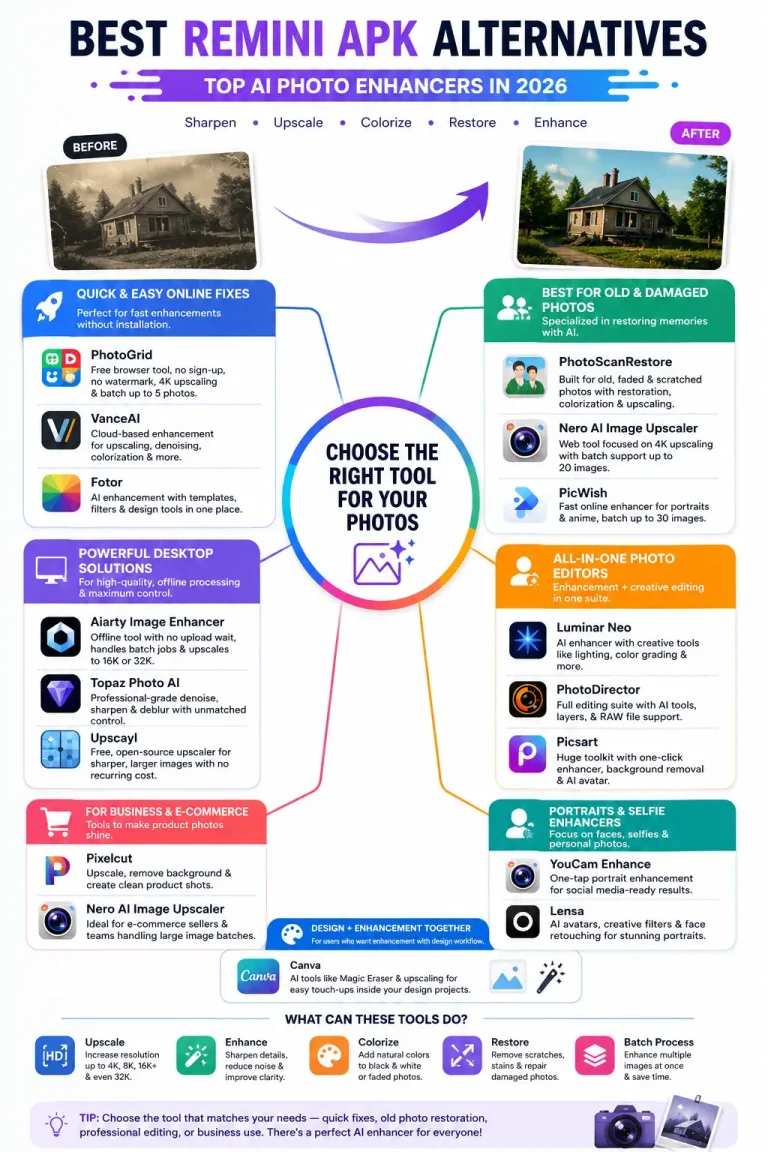
Here’s a rundown of the strongest tools worth trying, organized roughly from quick browser fixes to dedicated desktop software for heavier projects.
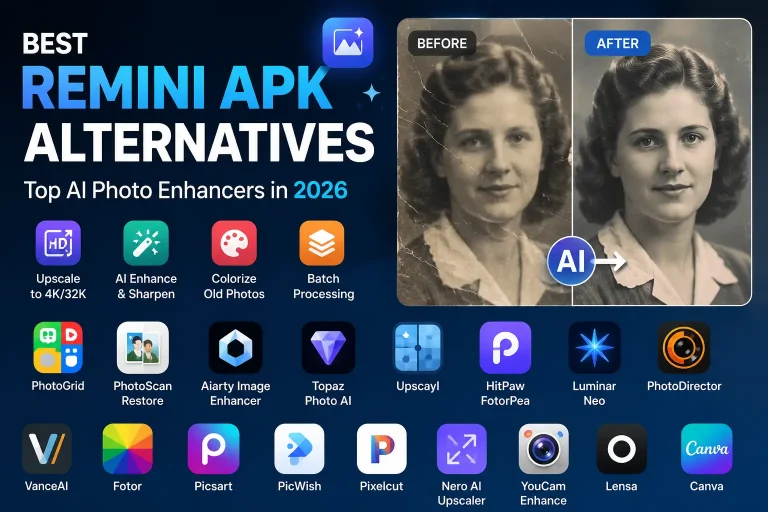
PhotoGrid
A free, browser-based enhancer that needs no sign-up and adds no watermark. It upscales images to 4K and lets you batch-process up to five photos at once, which makes it handy for quick social media fixes on a deadline.
PhotoScanRestore
Built specifically for old, faded, or scratched family photos rather than selfies. It pairs restoration with colorization and upscaling tools, and runs as both an iPhone app and a browser tool for Android, Mac, and PC users.
Aiarty Image Enhancer
A desktop tool that processes photos offline, so there’s no upload wait and no privacy worry about where your photo ends up. It handles batch jobs smoothly and can upscale images all the way up to 16K or 32K resolution.
Topaz Photo AI
A favorite among professional photographers for its precise denoising, sharpening, and deblurring controls. It costs more than most tools on this list, and the learning curve is steeper, but the level of control it offers is hard to match elsewhere.
Upscayl
A completely free, open-source desktop app built around image upscaling. It isn’t designed for scratch or stain repair, but if all you need is a sharper, larger image with no recurring cost, it gets the job done well.
HitPaw FotorPea
A general-purpose enhancer that handles upscaling, noise reduction, and color correction inside a simple, approachable interface. Batch processing and a few advanced tools sit behind a subscription, but the basics work fine for free.
Luminar Neo
Part photo editor, part AI enhancer, this one leans toward creative edits like lighting and color grading rather than strict restoration work. It suits photographers who want enhancement and artistic control bundled together.
PhotoDirector
A full editing suite that includes AI-powered enhancement alongside layer-based editing and RAW file support. It fits users who want more than a one-click fix and don’t mind a slightly steeper setup.
VanceAI
A cloud-based tool that handles upscaling, denoising, colorization, and even cartoon-style conversion. It runs entirely in the browser, so there’s nothing to install, though the free tier is fairly limited in image count.
Fotor
A broad online editor that bundles AI enhancement with templates, filters, and design tools. It’s convenient if you want enhancement and light graphic design in one place, though most AI tools require a paid plan to unlock fully.
Picsart
Known for its huge toolkit, ranging from background removal to AI avatar generation. The one-click photo enhancer works well for casual fixes, and the free version covers most everyday touch-up needs.
PicWish
A fast online enhancer with dedicated modes for portraits and anime-style art. It supports batch processing of up to 30 images at once, which is more generous than most free competitors offer.
Pixelcut
A lightweight upscaler built mainly for small business owners and marketers. The free plan covers basic upscaling and background removal, while 4K output and batch editing sit in the paid tier.
Nero AI Image Upscaler
A web tool centered on 4K upscaling with batch support for up to 20 images at a time. It’s a solid pick for e-commerce sellers and content teams working through large photo batches quickly.
YouCam Enhance
Strong specifically at portrait and selfie enhancement, with one-tap sharpening that’s ready for social media right away. It focuses mainly on faces, so full-scene or background detail isn’t really its strength.
Lensa
Built more for stylized avatars and creative filters than straightforward restoration work. It handles face retouching nicely, but it won’t reconstruct fine detail the way a dedicated AI upscaler will.
Canva
Not a dedicated photo enhancer, but its AI tools, like Magic Eraser and basic image upscaling, can handle light touch-ups inside a broader design workflow. Best if you’re already using Canva for other projects anyway.
How to Choose the Right Alternative for You
With this many options, matching the tool to your actual goal matters far more than chasing whichever app claims to be “best” overall.
Best for Old Family Photo Restoration
PhotoScanRestore stands out here, since it’s built around fading, scratches, and stains rather than just sharpening a face in the frame.
Best for Selfies and Portraits
Remini, YouCam Enhance, and Lensa all specialize in face-focused enhancement and tend to look natural on close-up portraits and headshots.
Best Free Option
PhotoGrid and Upscayl both offer genuinely free, unlimited use without watermarks, just through different platforms one in the browser, one on your desktop.
Best for Professional Print Work
Topaz Photo AI gives photographers the most fine-grained control over detail, which matters most when a photo is headed for a large, high-resolution print.
Best for Batch Processing Large Photo Sets
PicWish and Aiarty Image Enhancer both handle large batches efficiently, making them solid picks for content creators or anyone restoring an entire photo album at once.
Best Remini Alternatives Comparison Chart
Final Thoughts
There’s no single app that beats Remini at absolutely everything, and honestly, that’s fine. The right choice depends on whether you’re fixing a blurry selfie, reviving a decades-old family photo, or prepping images for print. Try the free tier of two or three options on the very same photo before committing to any subscription. A few minutes of hands-on testing will tell you more about which tool fits your needs than any single review, including this one.
Frequently Asked Questions
Quick answers to the questions people ask most often when comparing Remini to other photo enhancement apps.
Is Remini free to use?
Yes, but with daily limits on free enhancements, and a watermark or subscription typically required for full-quality downloads.
What is the best free Remini alternative?
PhotoGrid for browser-based use, or Upscayl if you prefer a free, open-source desktop app with no daily limits.
Does Remini add a watermark?
It can, depending on your plan, region, and the version of the app you’re using, so check current behavior before assuming either way.
Can AI enhancers change how a face looks?
Yes. AI models sometimes invent details that weren’t in the original photo, which can subtly change facial features or expressions.
Which app is best for old, damaged photos?
PhotoScanRestore is built specifically for that job, covering fading, scratches, stains, and natural color recovery in one workflow.
Are there desktop tools that work offline?
Yes Aiarty Image Enhancer, Topaz Photo AI, and Upscayl all run locally without needing an active internet connection.
Is PhotoGrid really free with no sign-up?
Yes, it works directly in the browser with no account required, no watermark added, and no daily image cap.
What’s the fastest Remini alternative?
PhotoGrid and PicWish both process images in just a few seconds, which is faster than most cloud-based competitors.
Can I batch process multiple photos at once?
Most modern tools support some level of batch processing, though free tiers often cap it at just a handful of images.
Should I scan my photo before enhancing it?
If you only have a printed photo, yes. A clean, glare-free scan gives the AI more real detail to work with than a blurry phone snapshot does.